

Cookie Warning in 2026: What It Should Say and 7 Live Checks Before You Show It
A useful guide to cookie warning should help readers understand both the rule and the behavior behind the rule. That is where consent topics become genuinely practical instead of sounding like recycled compliance copy.
The practical review for cookie warning starts when you look past the banner copy and test the live behavior. That is usually where teams find the real gaps: tags firing too early, weak refusal flows, and settings that drift after routine site changes.
A modern cookie warning is really the front edge of a live tracking-control system. It has to describe the right technologies, appear at the right moment, give people a real choice, and stay aligned with the deeper privacy explanation behind it.
This is why the current official guidance matters more than banner fashion. The ICO says you “must not pre-enable non-exempt storage and access technologies.” Your Europe says people must get “clear and comprehensive information” about cookies that require consent. The CNIL says “rejecting cookies should be just as easy as accepting them.” GDPR Article 12 still requires “clear and plain language.” And California’s Department of Justice says the privacy policy should give a “fuller description” of practices and that Global Privacy Control can be “one acceptable method” for online opt-out requests.
That gives you the right frame for a cookie warning review in late 2026.
The more useful question is not does the warning look official.
It is does the live site warn honestly about what happens, let people refuse it cleanly, and connect that warning to the controls and policy routes that still work after launch.
If you want nearby context first, start with these guides to cookie banner, website cookie notice, and cookie law. This page stays narrower. It is the cookie warning review I would use this week before approving copy or shipping a banner change.
If your team is trying to get cookie warning under control without adding a heavyweight privacy stack, DataShyre can help. DataShyre focuses on consent and preference management that are easier to implement, easier to operate, and easier to trust on a live site. Start with DataShyre’s consent and preference management or book a demo.
If your team needs help aligning the warning text with the live tag stack, privacy notice, and opt-out behavior, DataShyre can help with consent implementation review, privacy-page cleanup, and runtime testing so the warning says what the site actually does.
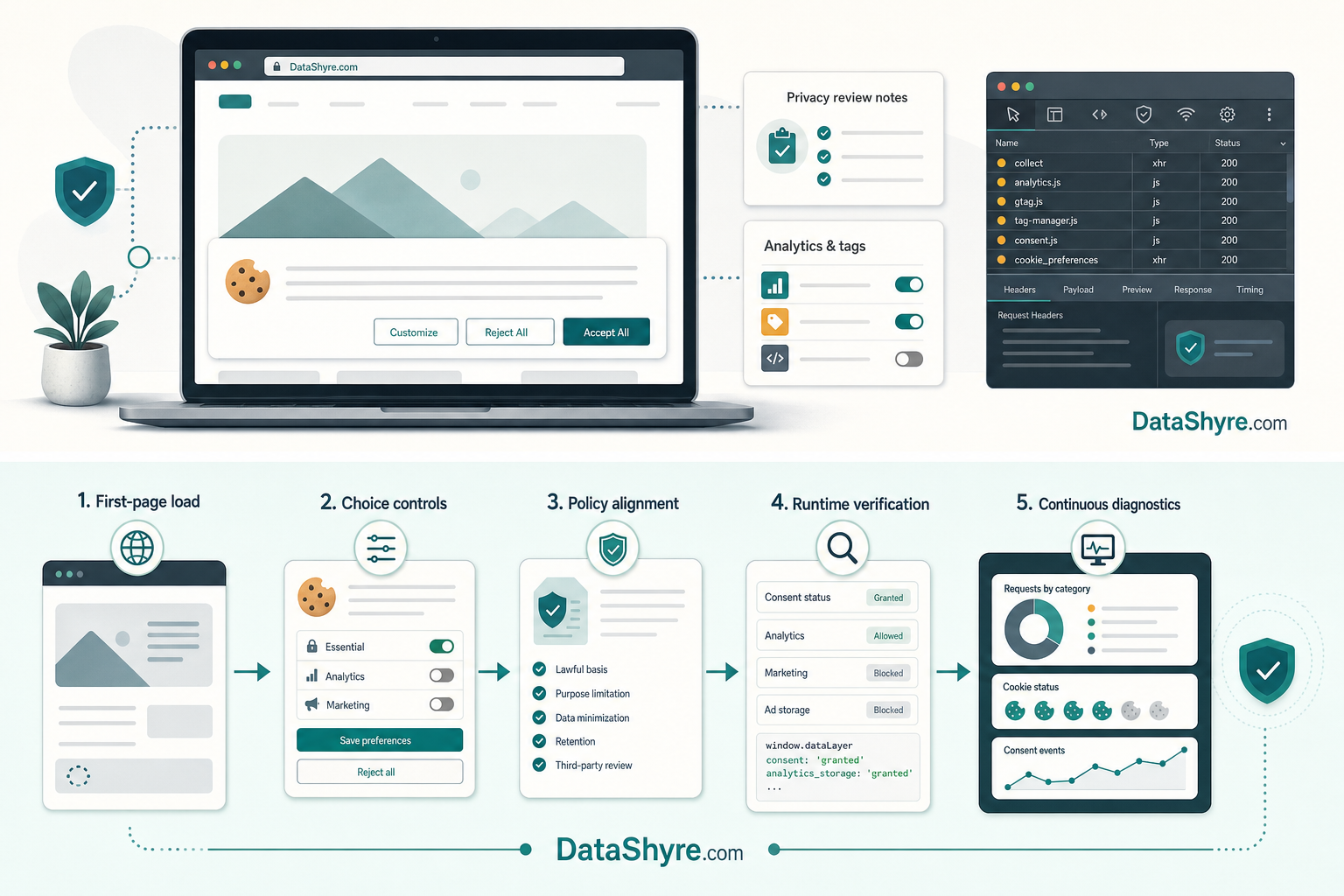
1. Decide what the cookie warning is actually warning about
The first cookie warning mistake is pretending the warning is only about classic cookies.
That is already too narrow for many live websites.
The ICO’s April 29, 2026 guidance is broader than old cookie-only explainers. It covers cookies, tracking pixels, device fingerprinting, and similar storage or access techniques. So before you edit a word, define the real scope:
- browser cookies;
- local or session storage;
- analytics and advertising tags;
- pixels and embeds;
- chat, video, or map tools that store or read identifiers; and
- regional variants in consent or opt-out handling.
If the live stack reaches beyond named cookies, the cookie warning should not imply that one small browser table tells the whole story.
2. Test first-load behavior before you trust the warning copy
This is still the fastest reality check.
The ICO says you “must not pre-enable non-exempt storage and access technologies.” That means the first useful cookie warning review starts with runtime behavior, not wording:
- open the site in a clean browser session;
- do not click anything yet;
- inspect requests, storage, and cookies;
- repeat on the homepage and the templates that get the most traffic; and
- repeat on mobile if mobile traffic matters.
A polished cookie warning can still sit on top of analytics, ad tags, or third-party embeds that fire too early. If that is happening, the warning is already behind reality.
3. Make refusal as easy as acceptance on the first layer
This is where a lot of weak cookie warning implementations give themselves away.
The CNIL says “rejecting cookies should be just as easy as accepting them.” That is not just a design preference. It is one of the clearest tests of whether the warning presents a meaningful choice or just a persuasive nudge.
So review the first layer like a visitor would:
- is there an explicit refusal path when consent is required;
- does refusal take the same number of clicks as acceptance;
- is the reject control visually clear instead of hidden as weak body text; and
- does the same pattern hold on desktop and mobile.
If Accept all is obvious but refusal is buried, the cookie warning is not really warning. It is pushing.
4. Say enough in plain language to make the warning useful
A vague cookie warning is usually worse than people admit.
Warnings that only say we use cookies to improve your experience do not tell a person what changes when they click yes, no, or manage settings.
That is where the official language standard still matters. Your Europe says people need “clear and comprehensive information” when consent is required, and GDPR Article 12 still requires “clear and plain language.”
A stronger cookie warning usually explains, in plain English:
- whether the warning covers analytics, advertising, personalization, or only necessary functions;
- whether third parties receive data;
- where the person can manage categories or preferences;
- where to find the fuller policy explanation.
The goal is not to dump the entire policy into the banner.
The goal is to make sure the first layer is specific enough that the visitor can understand what kind of tracking is on the table.
5. Connect the warning to the deeper privacy and opt-out story
This is where many cookie warning setups drift.
The banner uses one vocabulary.
The privacy policy uses another.
The opt-out page says something else.
California’s Department of Justice says the privacy policy should give a “fuller description” of privacy practices and rights. It also says Global Privacy Control can be “one acceptable method” for online opt-out requests.
That means a practical cookie warning review should compare the warning against:
- the privacy policy or cookie page;
- the category labels in the preference center;
- any
Do Not Sell or Shareroute; - browser-signal handling where relevant, including GPC.
If the warning suggests one control model while the deeper notice or opt-out flow tells a different story, the site is teaching users the wrong thing.
6. Make the warning easy to revisit after the first click
A cookie warning is not finished once someone clicks once.
People need a practical way to change their minds later.
That means your live review should check:
- whether the preferences link or icon stays easy to find;
- whether a prior acceptance can actually be withdrawn;
- whether a prior refusal stays respected on return visits; and
- whether the choice changes the live runtime quickly instead of only changing the UI.
If the site promises that people can manage preferences later, that promise should survive real testing after the first acceptance path, after navigation, and after a revisit.

7. Treat the warning as a release-controlled asset, not a one-time copy block
The long-term cookie warning risk is drift.
New tags get added.
Embeds change.
Marketing tools update.
The consent platform changes categories.
But the warning copy stays frozen.
That is how an accurate warning becomes misleading.
A stronger cookie warning workflow ties banner review to change management:
- retest after new tags, pixels, or embeds are added;
- review after privacy-policy or preference-center changes;
- check again after builder, plugin, or app updates;
- keep clear ownership so someone is responsible for accuracy.
If the tracking layer can change without forcing a cookie warning review, the warning will drift out of date faster than most teams expect.
The practical review I would use this week
If you were reviewing a cookie warning today, use this order:
- define the real technologies in scope;
- test what happens before any click;
- check first-layer refusal parity;
- tighten the language until the warning is plain and specific;
- compare the warning to the privacy-policy and opt-out routes;
- test how people revisit or withdraw their choices; and
- tie warning updates to release and vendor changes.
That sequence usually tells you more than polishing button colors.
If your team wants help turning a cookie warning into a defensible live control instead of a decorative heads-up, DataShyre can help with runtime audits, policy alignment, consent implementation, and practical remediation work.
FAQ
Is a cookie warning the same thing as a cookie policy?
No. A cookie warning is usually the first-layer disclosure or entry point for choice. A cookie policy or privacy policy goes deeper on categories, vendors, purposes, and rights.
Can a cookie warning be compliant if the wording is good but tags fire early?
No. If optional technologies load before the required choice is captured, the wording is not enough.
Does a US-facing site still need to care about the cookie warning if it is not running EU-style consent?
Seen clearly, cookie warning is less about a pop-up and more about whether the site behaves honestly after the visitor makes a choice.
Sources
- ICO, Guidance on the use of storage and access technologies: https://ico.org.uk/for-organisations/direct-marketing-and-privacy-and-electronic-communications/guidance-on-the-use-of-storage-and-access-technologies/
- ICO, How do we comply with the PECR rules?: https://ico.org.uk/for-organisations/direct-marketing-and-privacy-and-electronic-communications/guidance-on-the-use-of-storage-and-access-technologies/how-do-we-comply-with-the-pecr-rules
- Your Europe, Online privacy: How to use cookies on your website: https://europa.eu/youreurope/business/growing/digitalising/online-privacy/index_en.htm
- CNIL, Dark Patterns in Cookie Banners: https://www.cnil.fr/en/dark-patterns-cookie-banners-cnil-issues-formal-notice-website-publishers
- EUR-Lex, Regulation (EU) 2016/679, Article 12: https://eur-lex.europa.eu/eli/reg/2016/679/oj/eng/
- California Department of Justice, California Consumer Privacy Act (CCPA): https://oag.ca.gov/privacy/ccpa
- California Department of Justice, Global Privacy Control (GPC): https://oag.ca.gov/privacy/ccpa/gpc